
JCode vs Superset
Superset is a macOS desktop app for running CLI coding agents in parallel git worktrees. Source-available under the Elastic License 2.0.
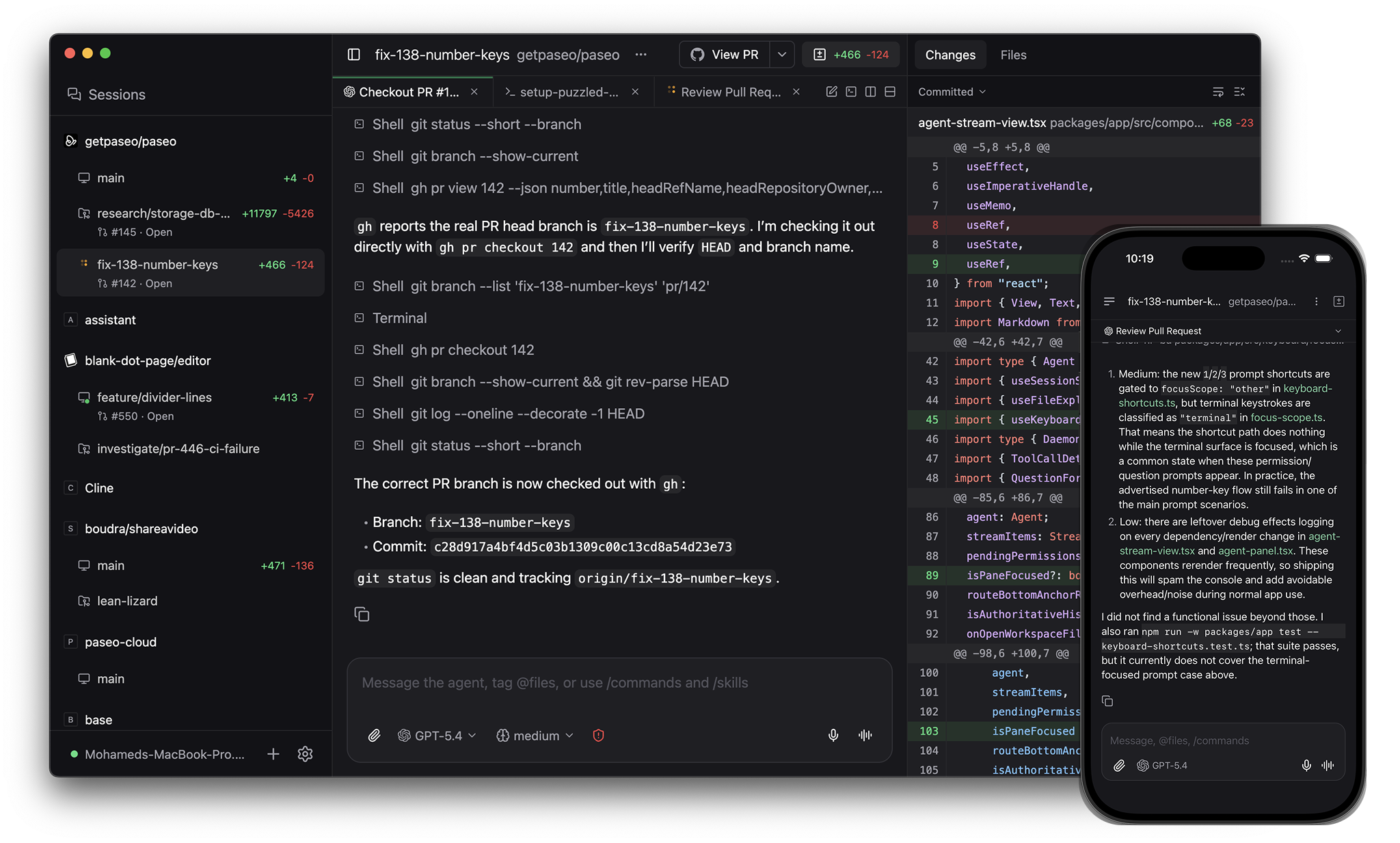
JCode is an app for orchestrating coding agents, with native clients on desktop, mobile, web, and the CLI. Open source (AGPL-3.0).
When to pick what
Pick Superset if you prefer a terminal-first interface where agents live inside terminal panes.
Pick JCode if you want:
- An OSI-approved open source license (AGPL-3.0)
- Linux or Windows
- A native mobile app
- No login wall
- A per-agent UI with modes, slash commands, and file pickers
- Free without seat limits
License
JCode is open source under AGPL-3.0. Audit it, fork it, redistribute it.
Superset is source-available under the Elastic License 2.0. The source is on GitHub, but the license restricts hosting it as a service and limits redistribution.
Login
Superset's desktop app shows a Superset login wall on first launch. A Superset account is required to use it.
JCode does not require any login.
Architecture
The JCode daemon runs as its own process. Desktop, web, mobile, and CLI clients connect to it. Run the daemon on your laptop, on a server, or in Docker, and connect from anywhere.
Superset's desktop is the host. Agents run inside it.
Providers
Both tools support many agents. Superset is a terminal multiplexer where each agent runs inside a terminal pane. JCode runs Claude Code, Codex, OpenCode, and Pi natively with a per-agent UI (modes, slash commands, file picker, diff viewer), plus 30+ more agents through the in-app catalog via ACP, plus any custom CLI agent. See Supported providers.
Panes
JCode's app has split panes and tabs. Panes include a diff viewer and a browser for testing running services. Agents render as native UI with modes, slash commands, and file pickers.
In Superset, each agent runs inside a terminal pane.
GitHub
JCode's app handles commit, push, opening PRs, watching checks and reviews, and merging.
CLI
JCode has a CLI that mirrors the app:
jcode run --provider codex "implement OAuth"
jcode run --host devbox:6767 "run the test suite"
jcode ls
jcode send <agent-id> "add tests"
jcode schedule create --cron "0 9 * * 1" "audit the codebase"
jcode run --host connects to a remote daemon. jcode schedule runs an agent on a cron. jcode loop retries an agent until a verification command passes.
Superset is a desktop app and does not have a CLI.
Worktrees and services
Both tools isolate parallel agents in git worktrees.
JCode also gives each worktree its own dev server URL like web.fix-auth.my-app.localhost, so parallel agents don't fight for ports.
Mobile
JCode ships native iOS and Android apps with the same feature set as the desktop. Superset does not have a mobile app.
Voice
JCode's speech-to-text and text-to-speech run locally on your device. Superset does not have voice.
Pricing
JCode is free with no seat limits.
Superset is free for one seat with local workspaces only. Team features and sync start at $20 per seat per month.
Comparison
| JCode | Superset | |
|---|---|---|
| License | Open source (AGPL-3.0) | Source-available (Elastic License 2.0) |
| Platforms | macOS, Linux, Windows | macOS only |
| Native mobile | iOS, Android | — |
| Login required | No | Yes (Superset account) |
| Pricing | Free | Free 1 seat, $20/seat/mo Pro |
| Per-agent native UI | Yes (modes, slash commands, file picker, diff viewer) | Terminal output |
| Split panes and tabs | Yes | Yes (terminals) |
| In-app browser | Yes | — |
| GitHub workflow in app | Commit, push, PR, checks, reviews, merge | Yes |
| Git worktrees | Yes | Yes |
| Per-worktree dev server URLs | Yes | — |
| CLI | Run, --host, ls, send, schedule, loop | — |
| Local voice (on-device) | Yes | — |
| Self-hosted daemon | Yes | — |
See also: JCode vs Conductor, JCode vs OpenChamber, JCode vs Happy Coder.